
Download Katalist – AI Visual Storyboarding Tool for Filmmakers, Advertisers & Content Creators
Overview
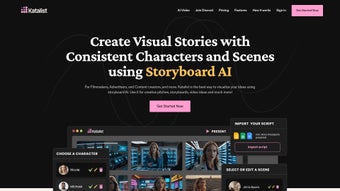
Katalist is a cloud‑based generative‑AI platform that transforms raw screenplay files into polished, ready‑to‑share storyboards. Built for filmmakers, advertising agencies, and digital content creators, the service accepts scripts in CSV, Microsoft Word, and PowerPoint formats, parses them for characters, locations, and actions, and instantly produces a sequence of visual panels that retain strict character consistency. This means that a single adjustment—such as changing a character’s outfit, pose, or lighting—propagates across every frame where that character appears, saving countless hours of manual redrawing.
Katalist shines in the pre‑production phase, giving directors a quick visual reference for pitch meetings, marketers a vivid way to convey ad concepts, and writers a tangible sense of pacing before filming begins. The platform runs entirely in a secure, encrypted cloud environment, receiving automatic AI model updates so users always benefit from the latest visual generation techniques. While Katalist excels at speed, visual fidelity, and ease of use, it currently lacks native collaborative workspaces and offline capabilities, which can be a limitation for large teams or creators who travel frequently.
Overall, the tool bridges the gap between scriptwriting and visual planning, offering a fast, secure, and constantly improving solution for anyone who needs to visualize a story without hiring a full illustration crew.
Key Features & How They Work
- Dynamic Scene Generation: Upload a script and Katalist automatically creates individual scenes, complete with background settings and lighting cues.
- Character Posing Engine: Drag‑and‑drop controls let you fine‑tune character positions, facial expressions, and gestures, ensuring every frame tells the right story.
- Multi‑Format Script Import: Supports CSV, .docx, and PowerPoint, making it easy to bring existing work into the platform without conversion headaches.
- One‑Click Consistency Updates: Change a character’s outfit or posture once, and the alteration propagates throughout all relevant storyboard panels.
- AI‑Powered Visual Style Options: Choose from a library of artistic presets—cinematic, comic‑book, minimalist—to match the tone of your project.
- Export & Sharing Suite: Export storyboards as PDFs, PNG sequences, or interactive web links for client presentations or internal reviews.
Behind the scenes, Katalist combines natural‑language processing (NLP) with a diffusion‑based generative model. When a script is uploaded, the NLP engine extracts named entities—characters, props, locations—and builds a structured map of the narrative flow. This map feeds the diffusion model, which draws high‑resolution assets from an ever‑growing library of pre‑trained visual concepts.
Users can intervene at any stage: replace a generic prop with a custom image, swap a background for a more appropriate setting, or adjust lighting to match a specific mood. Because the service is fully cloud‑hosted, every improvement to the AI core—whether a new style preset or a better understanding of script nuances—is pushed to all accounts instantly, eliminating the need for manual updates or downloads. The result is a seamless loop where creators focus on storytelling while the AI handles the heavy lifting of visual synthesis.
Installation, Compatibility & Practical Usage Guide
Katalist is delivered as a Software‑as‑a‑Service (SaaS) solution, so there is no traditional installation required. Users simply register at katalist.com, verify their email address, and start a new storyboard project directly from the web dashboard. The interface follows responsive design principles, guaranteeing a smooth experience on desktop browsers, tablets, and even larger smartphones.
Supported Operating Systems
Any modern operating system that runs a recent version of Chrome, Edge, Firefox, or Safari—including Windows 10/11, macOS Monterey or later, popular Linux distributions, iOS 13+ and Android 9+ browsers—is fully supported.
Step‑by‑Step Usage Instructions
- Create a Project: Click “New Storyboard,” give it a descriptive title, and select the script format you plan to upload.
- Upload Your Script: Drag the file into the upload zone or use the “Browse” button. Katalist validates the file and confirms successful parsing.
- Review Auto‑Generated Scenes: A thumbnail timeline appears. Click any scene to open a detailed view where AI‑generated visuals are displayed.
- Adjust Characters & Props: Use the Character Posing tool to rotate, scale, or change facial expressions. Drag custom PNG assets onto the canvas to replace default props.
- Apply Visual Styles: Choose a preset (cinematic, comic‑book, minimalist) or fine‑tune color grading, contrast, and shadows manually.
- Export or Share: When satisfied, click “Export” to download a high‑resolution PDF, a PNG sequence, or generate a shareable web link that updates in real time as you make further edits.
All project data is saved automatically to Katalist’s encrypted cloud storage. End‑to‑end HTTPS encryption and AES‑256 at‑rest protection keep scripts and visual assets private. For teams that need version control, the “Save As” function creates snapshot copies at any development stage, allowing you to revert to earlier drafts if needed. The platform also integrates with Zapier and provides a REST API, so you can push storyboards into project‑management tools such as ShotGrid, Trello, or Asana with a few clicks.
Pros, Cons & Expert Review
Pros
- Lightning‑fast AI generation of complete storyboards from raw scripts.
- Intuitive character posing that maintains consistency across scenes.
- Broad script format support eliminates tedious conversions.
- Cloud‑based updates keep visual quality on the cutting edge.
- Multiple export options cater to internal reviews and client‑facing presentations.
- Secure, GDPR‑compliant data handling ensures privacy for proprietary content.
Cons
- No native collaborative workspace for simultaneous multi‑user editing.
- Requires a constant internet connection; offline work is not possible.
- Visual style library, while diverse, may not cover highly niche artistic directions.
- Pricing tiers can be steep for hobbyists or very small indie teams.
- AI processing is currently optimized for English scripts; other languages are in beta.
Reviewer’s Verdict
Katalist dramatically speeds up my storyboard workflow. The AI generates solid scene drafts, and the character posing tool keeps my characters consistent across shots. While I miss a real‑time collaboration board, the platform’s security, export flexibility, and seamless cloud updates make it a fantastic addition to any indie production pipeline.
Rating: 5/5
Frequently Asked Questions
Is Katalist free to use?
Katalist offers a 14‑day free trial with full feature access. After the trial, a subscription is required; plans start at $19 USD per month for individual creators.
Can I import custom images for characters or backgrounds?
Yes. The platform lets you upload PNG or JPEG assets and assign them to characters, props, or scene elements, giving you full creative control beyond the AI library.
How secure is my script data?
All data is transmitted over HTTPS and stored with AES‑256 encryption. Katalist complies with GDPR and does not share user content with third parties.
Does Katalist support multiple languages?
The AI processes English scripts most accurately, but beta support for Spanish, French, and German is already available and will be expanded in future releases.
Can I integrate Katalist with other production tools?
Katalist offers Zapier connectors and a REST API, allowing you to push storyboards into project‑management suites like ShotGrid, Trello, or Asana.
Conclusion & Call to Action
For creators who need a fast, reliable way to visualise scripts without hiring a full illustration team, Katalist delivers a compelling mix of AI‑driven automation and hands‑on control. Its strengths—rapid scene generation, character consistency, extensive export options, and continuous cloud updates—make it a strong addition to any pre‑production workflow. While the lack of built‑in collaboration and offline mode may require workarounds for larger teams, the platform’s security, integration capabilities, and ease of use outweigh these drawbacks for most independent professionals. Ready to turn your next script into a polished storyboard in minutes? Start your free trial today and experience the future of visual storytelling.



.png)



